School pickup
The right adult, the right child, every afternoon.
Parents say they’ve arrived with one tap. Teachers see who is at the gate and whether they may collect. And a person at your school still checks who is standing in front of them, because a phone is not a person.
- No hardware, tags or beacons
- Set up in about ten minutes
- Every release on the record
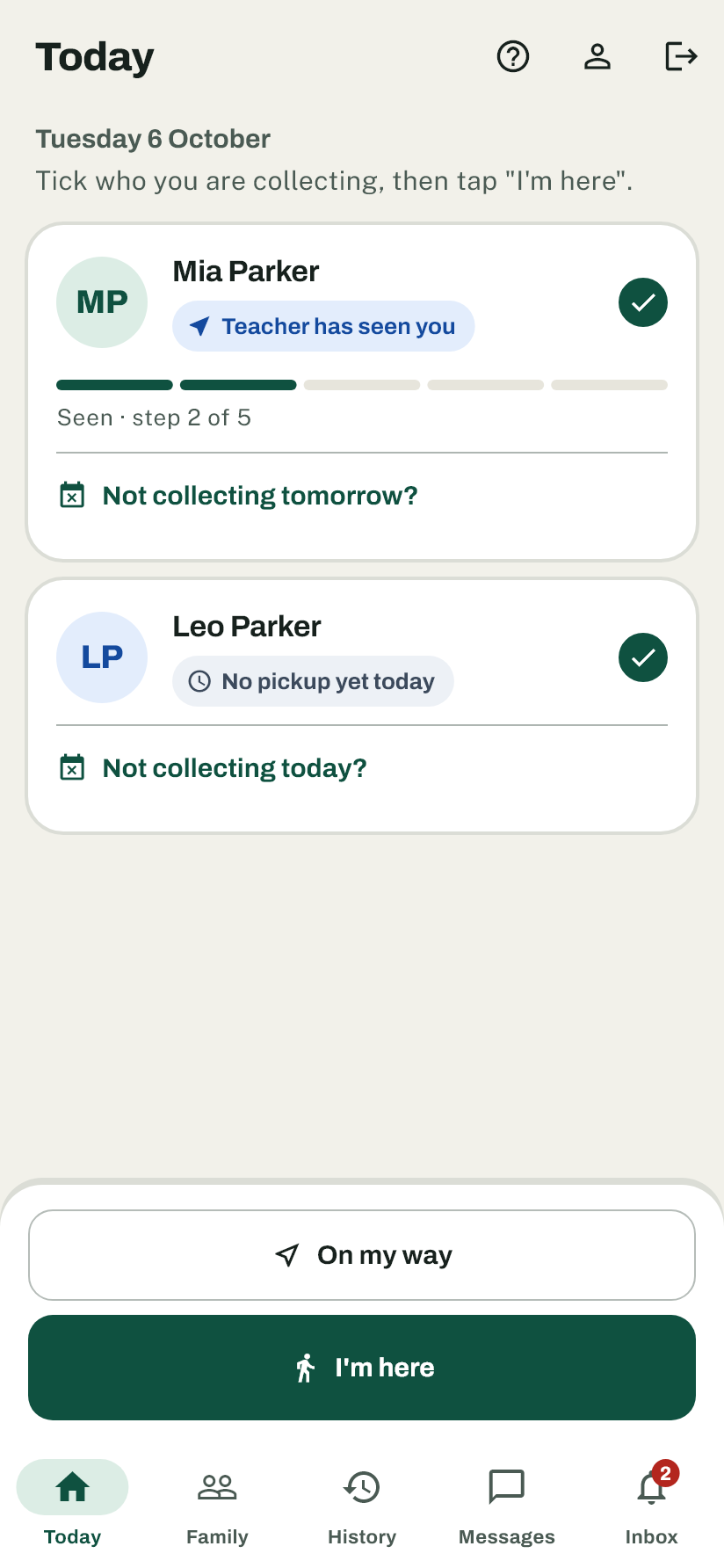
How a pickup goes
Four steps, most of them one tap.
- Step 1
On my way
Optional. The parent shares where they are for the trip, so the teacher has the child ready. Nothing is kept afterwards.
- Step 2
I'm here
One tap at the gate. It only works inside the pickup area, so nobody checks in from home.
- Step 3
Staff check who it is
The teacher sees the adult, the child and whether the rules allow it — then checks the person in front of them.
- Step 4
Released, and recorded
Who collected, who released, and how identity was checked. The record can be added to, never changed.
For parents and carers
Built for one hand, at the kerb.
Big buttons, plain words, light or dark to match your phone — and it tells you honestly what is happening, including when it can’t reach the school.
Leaving? Say so.
Sharing is your choice, only while the screen is open, and it stops by itself when you arrive.
Add someone to collect
A grandparent or a sitter — the school approves them first.
Not collecting today?
Absent, on the bus or at after-care: tell the school in two taps.
No signal at the gate?
Get a six-digit pickup code and show it to staff instead.
News from the class and the office
Announcements you can answer yes or no to, and urgent notices that reach every family at once.
For teachers and the office
Dismissal on one screen, not a walkie-talkie.
The queue moves by itself as parents arrive. Each card says who the adult is, which child, and whether your rules allow it today. It runs in a browser at the office and on a teacher’s phone at the door.
Custody and schedules
Who may collect on which days, court orders, and restrictions that always win over a schedule.
End-of-day check
After dismissal the queue lists children nobody has come for, and their parents get a reminder.
Reports
Release log, late pickups and office overrides as spreadsheets, for any period.
Emergency broadcast
One urgent message to every family: early dismissal, a closure, “do not come”.
School calendar
Closed days and early finishes, so nothing fires on a day off.
Announcements that get answered
See who has seen each class announcement, and who said yes or no.
When it says no
It refuses rather than guesses.
If two custody schedules disagree, or someone isn’t approved yet, Curbwise does not pick a winner. It sends the pickup to your office and tells the adult to go there, without saying why, because whoever is holding the phone may not be entitled to know.
Staff can still release after checking in person, but only with a written reason, kept permanently under their name.
A person checks the person
The app shows who is expected. Your staff confirm who is actually there, and the release records how: photo ID, known to staff, or a staff escort.
Decided on the server, not the phone
Every check-in is judged by our server. A request from outside the pickup area fails however it was sent.
Lock screens say nothing
Pickup notifications never name a child, an adult or a place. The detail is only inside the signed-in app.
Location is not kept
On-my-way sharing shows the current point only. No route is stored, and it clears when the parent arrives.
The record cannot be rewritten
The pickup log can only be added to. Closing a staff account or a student leaving does not erase their history.
FAQ
Questions, answered.
Pick who you are to see the questions that matter to you.
Does the app identify who is collecting?
No — your staff do.
The phone shows the parent is here. A person at the counter checks who they are, and the release records how: photo ID, known to staff or a staff escort.
What if two custody schedules disagree?
It stops and sends the pickup to the office.
Nothing is released until a staff member sorts it out in person. It never guesses about a child.
Can it handle a court order?
Yes.
Add a restriction against a specific person — “never releases” or “always check with the office”. A restriction always wins over a schedule.
Can staff override a refusal?
Yes, after checking in person, and with a written reason.
The release stays blocked until the reason is entered, and it is kept permanently under that staff member’s name.
Can someone get around the app?
No.
Every check-in is decided on our server, not on the phone. A request from outside the pickup zone fails the same way however it was sent.
What do we need to get started?
Your roster, your pickup spot and your staff’s emails.
The roster can come straight from a spreadsheet. No hardware, beacons or windshield tags. Most schools are set up in about ten minutes.
Can a record be changed or deleted later?
No.
The pickup log can only be added to. Even when a staff account is closed or a student leaves, their history stays.
Can a grandparent or nanny pick up?
Yes, once the school approves them.
Add them from the app in about twenty seconds. They can collect as soon as the office says yes.
What if I have no phone, or my location is off?
Go to the office and staff will check you in.
The same safety checks still apply — it just happens at the counter instead of in the app.
Is my location tracked?
Only while you choose to share it on the way.
We keep your latest position only, never the route, and stop the moment you stop sharing.
Can other schools see our families?
No.
Each school’s data is kept completely separate. One school cannot reach another school’s roster.
Are the families on this page real?
No — they are all made up.
Maplewood Elementary is a demonstration school. The software is real.
Didn’t find your question? Ask us in a walkthrough.
See it with your own cases
Book a walkthrough.
Thirty minutes with a person, on a demonstration school. Bring the awkward situations: shared custody, a last-minute grandparent, a phone with no signal. We’ll run them in front of you.
- We never ask for your roster to run a demonstration.
- Nothing is added to a mailing list.
- A person replies, usually the same day.